Managing infrastructure with Ansible has always been a core part of how we work. As a small DevOps team of three, we rely heavily on automation to keep our systems running smoothly. However, as our infrastructure grew, we started hitting challenges that slowed us down and created inconsistencies.
Before continuing to the post, we should mention what we have achieved.
- Before, it was taking 3 hours to complete all Ansible roles on all our servers with a centralized run from our local machines.
- Now, each server runs in a decentralized way, and it takes 10 minutes to complete all roles on each server.
The Problem with Everyone Pushing from Local Machines
In our initial workflow, each team member would run ansible-playbook commands directly from their own local machines. This was easy at the start but became problematic as we scaled:
- Inconsistencies: Different local setups led to different results.
- Lack of Visibility: Hard to know who changed what and where it was applied.
- Conflict Risks: Overlapping deployments caused conflicts and headaches.
- Manual Overhead: Too much human intervention, increasing the chance of mistakes.
Why We Moved to Git Based Pull Model
To address these issues, we switched from manual pushes to an automated Git based pull model. Instead of pushing configurations from our laptops, each server now checks for changes in Git and applies them automatically.
Benefits we immediately saw:
- Single Source of Truth in Git.
- Automated Consistency across servers.
- Better Collaboration via Git PRs.
- Simplified Scaling, adding servers became frictionless.
Hard Lessons: Challenges We Faced with Ansible Pull
While the new approach brought many benefits, getting it right wasn't without its difficulties. Here are the main challenges we faced and how we solved them:
1. Submodule Headaches
One of the first issues was with Git submodules. Our Ansible repo uses submodules to manage common roles and playbooks. However, when we committed updates to submodules, the automation on servers started failing with this error:
"local modifications exist in the repository"
This happened because Git detected differences in submodule references and didn't want to overwrite them by default.
Solution:
We fixed this by ensuring the server forcibly resets to the latest Git state during each sync, solving the submodule mismatch issue.
2. Resource Usage and Load Spikes
Running Ansible tasks repeatedly without any real changes was wasting CPU and memory across all servers. We needed a smarter trigger mechanism.
Solution:
We implemented a commit hash check mechanism:
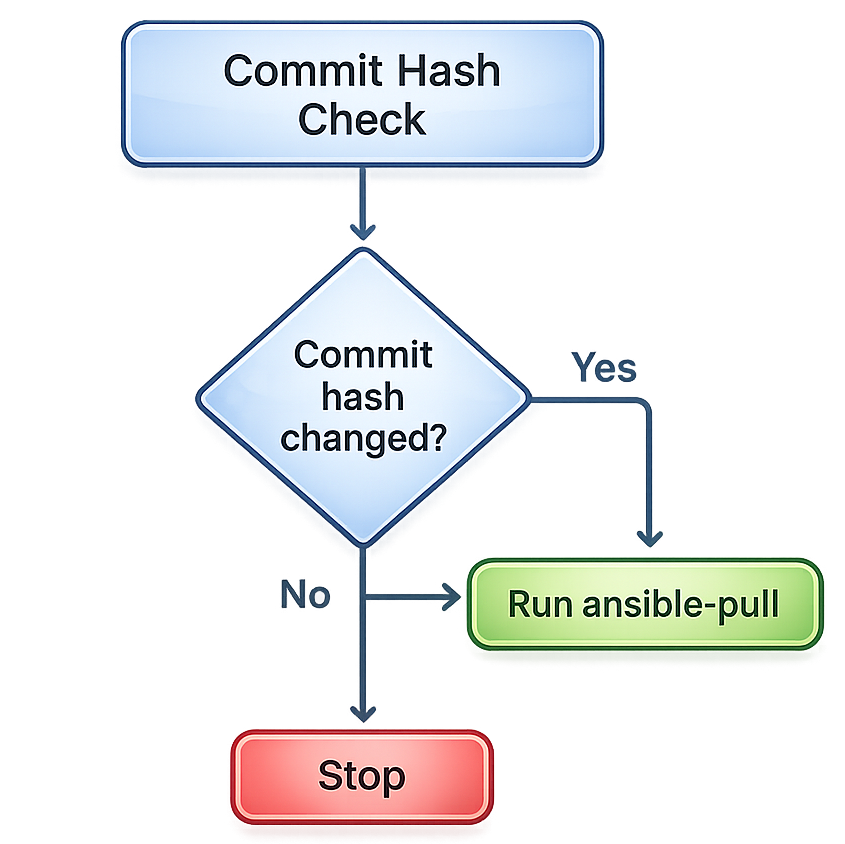
- Before running Ansible, the server fetches the latest commit hash from the Git remote.
- If the hash has changed since the last run, it performs a Git pull and then runs the Ansible playbook.
- Regardless of whether the hash has changed, Ansible is guaranteed to run at least once per day, ensuring all servers stay consistently configured even during quiet periods.
- If any step fails, a failure notification is sent to the team immediately.
This drastically reduced unnecessary loads while keeping all servers up to date. We also made sure this mechanism handled first time runs correctly, when no repo exists locally, with logic to perform an initial clone and sync before the hash check kicks in.
Local Testing is Still Part of the Workflow
Even with Ansible Pull, we still develop and test changes locally before pushing them to Git. This ensures configurations are safe and verified before servers pull them automatically.
In short:
- Test locally.
- Push to Git.
- Servers detect the change, pull and apply automatically.
- If anything goes wrong, the team is notified immediately.
The Benefits in Practice
After the initial setup pains, Git Based Ansible Pull proved its worth:
- Consistent, reproducible deployments.
- Reduced manual work.
- Better resource utilization. Ansible only runs when there’s a real change, or once daily as a safety net.
- Improved team collaboration.
- Scalable with minimal effort.
- Proactive failure visibility via notifications.
Conclusion
Evolving our Ansible workflow was a big step forward for our team. We moved away from manual pushes and a simple scheduled ansible-pull to a smarter system: commit hash checking drives runs on change, a daily forced run acts as a safety net, and failure notifications keep the team in the loop.
While we faced challenges along the way, especially with Git submodules and resource management, these were solvable, and the long term benefits far outweighed the initial setup pains.
If you're managing infrastructure with a small team and facing similar scaling problems, we highly recommend adopting a Git driven Ansible automation workflow.