If you use CiviCRM to manage donations, event registrations, or membership signups, a lot happens between the moment someone lands on a contribution page and the moment they complete a transaction. Most of it is invisible. What you may not know is exactly where people are dropping off and why.
Google Analytics 4 has powerful funnel analysis tools. The problem is that CiviCRM's multi-step forms do not push any data to GA4 out of the box. Without structured tracking at every step, your analytics show you that people visited the contribution page. They do not show you that 40% of them abandoned at the payment confirmation screen.
That is the gap we built this extension to close.
What the Extension Does
The CiviCRM DataLayer extension (com.skvare.datalayer) automatically pushes GA4-compatible dataLayer events at every step of your CiviCRM contribution and event registration flows. It works with Google Tag Manager and requires no custom JavaScript on your part.
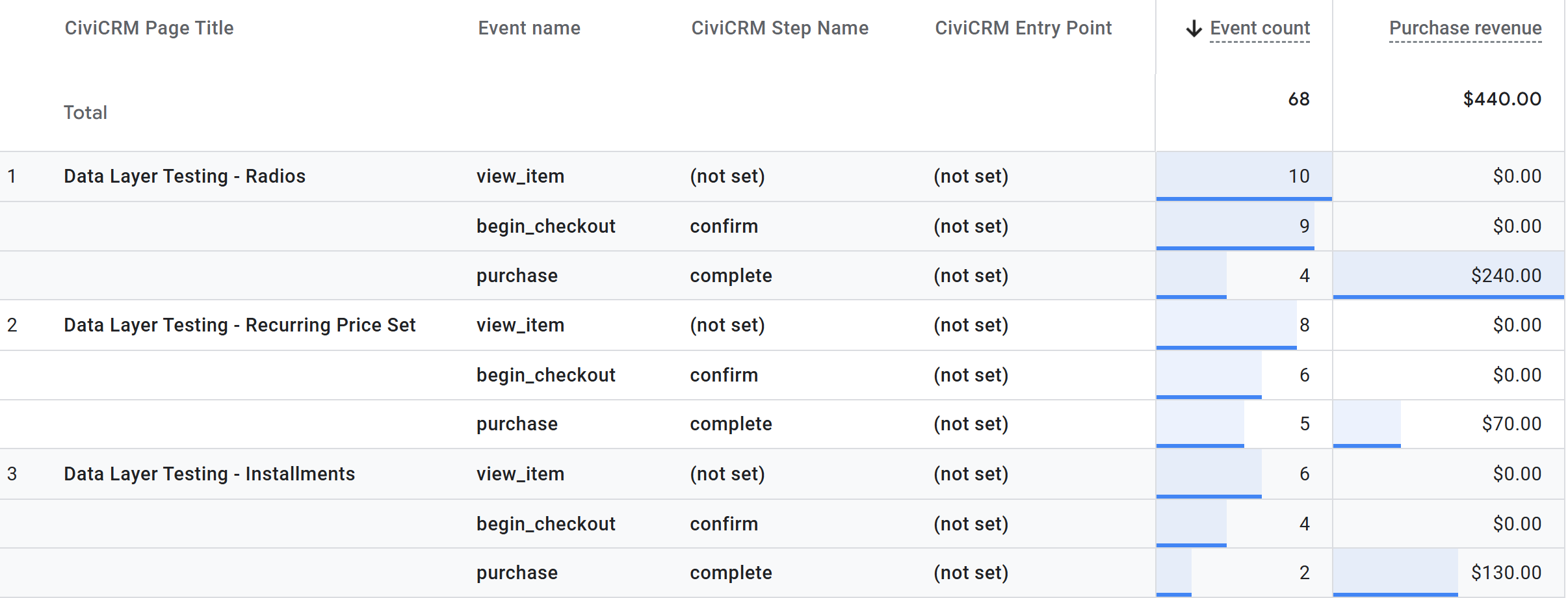
Every push includes a structured payload with entity details, funnel position, and campaign attribution. On the thank you page, it also sends a standard GA4 ecommerce block with transaction value and line items, so your revenue data flows into GA4's built-in Monetization reports automatically.
The events pushed are:
| CiviCRM Step | GA4 Event |
| Contribution page landing | civicrm_view_item |
| Event Info page | civicrm_view_item |
| Event Registration step 1 | civicrm_view_item |
| Contribution or Event Confirm page | civicrm_begin_checkout |
| Additional participant step | civicrm_registration_step |
| Contribution or Event Thank You | civicrm_purchase |
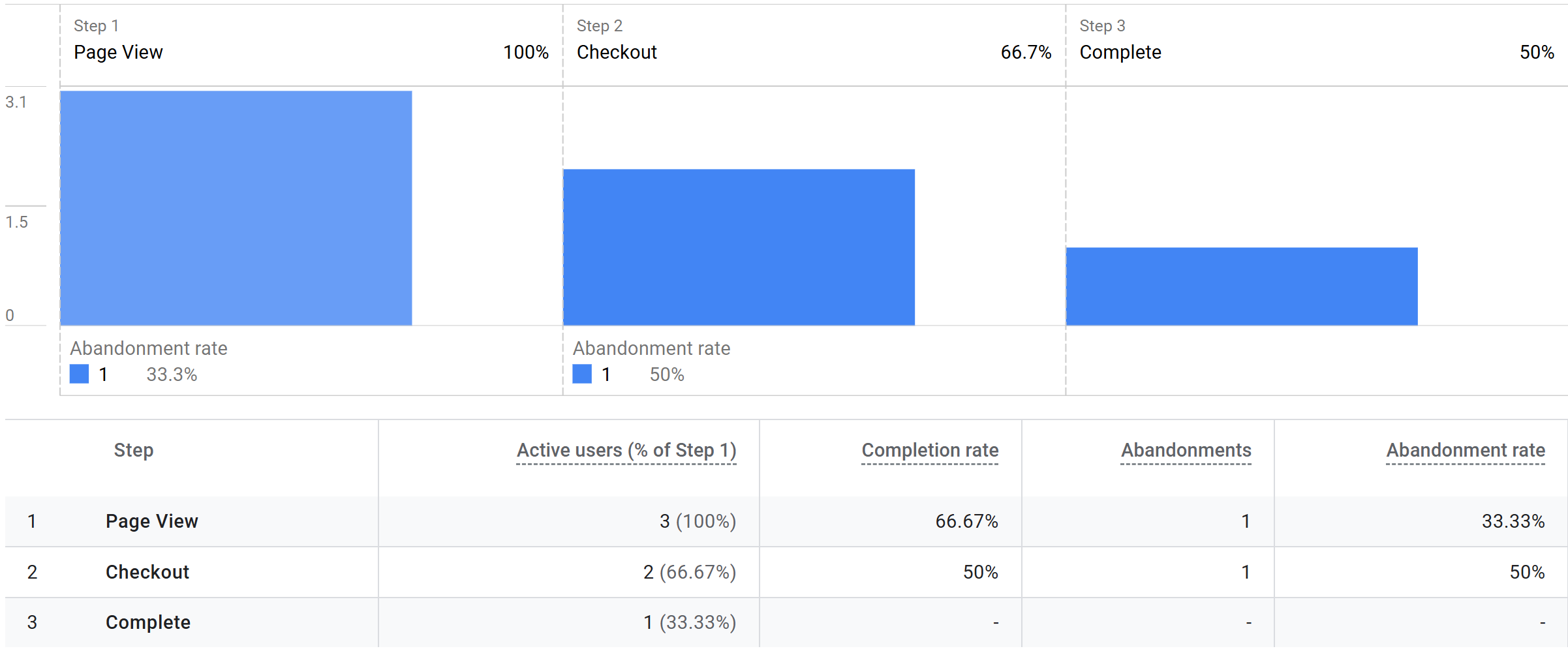
Each event includes a funnel block that tracks step_name, step_number, total_steps, and flow_type, giving you everything you need to build a Funnel Exploration report in GA4 that shows exactly where people drop off across different contribution pages and events.
What You Can See in GA4
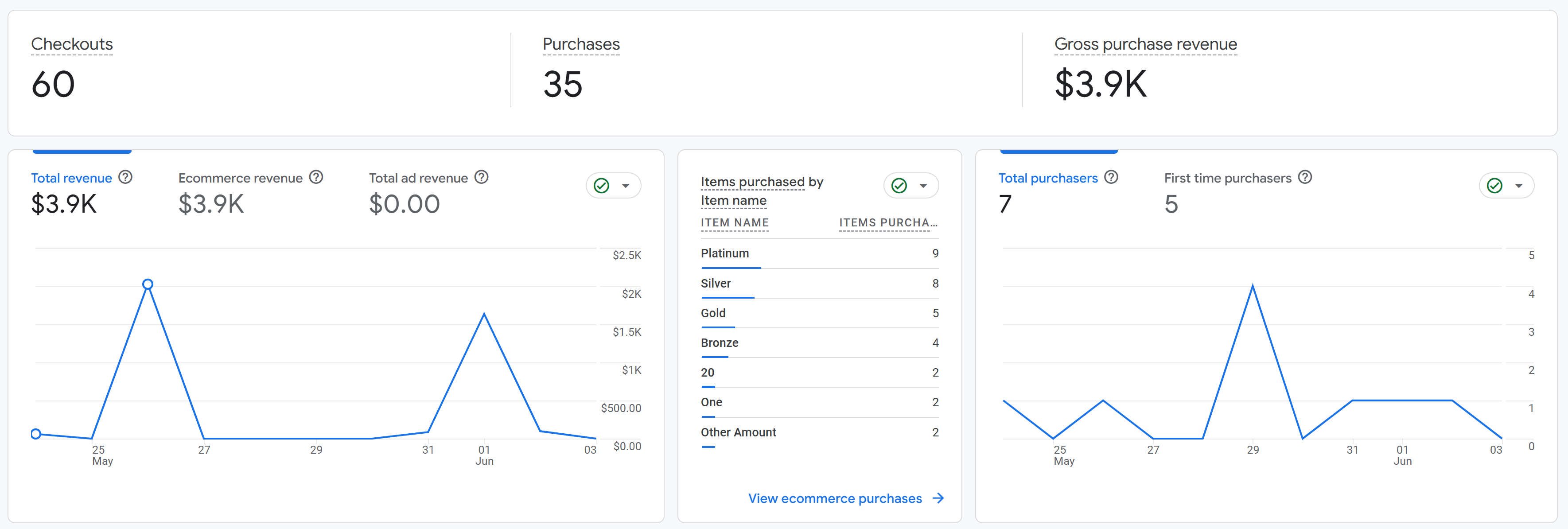
Once the extension is installed and your GTM tags are configured, you can build reports in GA4 that answer questions like:
- How many people viewed a contribution page but never reached the confirm step?
- Are visitors who land on the event info page more likely to complete registration than those who navigate directly to the registration form?
- Which events or contribution pages generate the most revenue?
- How many registrants added additional participants, and how many completed that flow?
- What percentage of recurring contributions have installments set?
These are not hypothetical questions. They are answerable with the data this extension pushes, using GA4's Funnel Exploration and Free Form exploration tools, and it feeds directly into Google Ads conversion tracking so you can see which campaigns are actually driving completed donations and registrations.
Three-Level Settings Control
One of the things that makes this extension flexible for larger CiviCRM installations is its three-level settings hierarchy.
Global settings give you a master on/off switch, entity-type toggles for contributions and events, and controls over which specific GA4 event types get pushed.
Per-page and per-event overrides let each contribution page and event inherit the global defaults or override them independently. A DataLayer tab is added directly to the contribution page and event management screens in CiviCRM. Each tracking option can be set to Inherit, Enabled, or Disabled at the individual level. This means you can track most events globally but suppress tracking on specific pages, or force tracking on a page even when the entity type is globally disabled.
Behavior settings let you control how test transactions are handled, what JavaScript variable name is used (in case your GTM setup uses a custom variable), and whether debug mode is active for console logging during development.
GTM Snippet Injection
When you enter your GTM Container ID in the global settings, the extension handles snippet injection automatically on every tracked page, including contribution main, confirm, and thank you pages, plus event registration, additional participant, confirm, and thank you steps, and the event info page. You do not need to add GTM to your theme or manage snippet placement yourself.
Who This Is For
This extension is useful for anyone running CiviCRM who wants to understand how people move through their online forms. That includes nonprofits tracking donor conversion rates, membership associations monitoring event registration completion, advocacy organizations measuring campaign contribution performance, and any other CiviCRM user who wants real funnel data instead of page view counts. If you run Google Ads to drive traffic to your contribution pages or events, the structured data this extension pushes also powers conversion tracking so you can measure which campaigns are actually working.
The extension is CMS-agnostic. It works on WordPress, Drupal, and Joomla without any CMS-specific configuration. Ready to get started? The extension is available on GitHub at github.com/Skvare/com.skvare.datalayer. For full setup instructions covering Google Tag Manager configuration, GA4 custom dimensions, and building funnel reports, see our CiviCRM DataLayer Extension: Google Tag Manager and GA4 Configuration article.
Get Help or Build Something Custom
Need help setting up the CiviCRM DataLayer extension on your site, or looking to build a custom CiviCRM integration? Skvare works with organizations of all sizes to implement, extend, and maintain CiviCRM.
Get in touch and tell us what you are trying to accomplish.