Nobody should keep getting charged for a subscription they've already changed. But that's exactly what was happening — and it took a custom CiviCRM extension to fix it cleanly.
The Problem
Rigpa US runs a membership program with two payment paths: a one-time annual membership and a recurring monthly membership that auto-renews.
When members switched between them, two things went wrong.
First, recurring contributions weren't being canceled. If someone had an active monthly recurring contribution and then signed up for an annual membership, their monthly charges kept running in Authorize.Net. The new annual payment processed and the membership type updated, but the old subscription stayed active at the payment processor.
Second, the auto-renew flag on the membership record wasn't being updated to match the new payment arrangement. A member who switched from monthly to annual would still show as auto-renewing even though no recurring contribution should exist. A member going the other direction might not have the flag set correctly at all.
The same issues appeared when members resubmitted the monthly form to change their membership level — a second recurring subscription could be created without canceling the first.
Staff were catching these cases manually. That's not a sustainable solution.
What We Built
We developed a custom CiviCRM extension to handle these transitions automatically. The extension watches for specific membership changes and responds accordingly.
A settings page lets site administrators designate which membership types are Monthly and which are Annual. This keeps the logic flexible — no hardcoded type names, and easy to update if membership tiers change in the future.
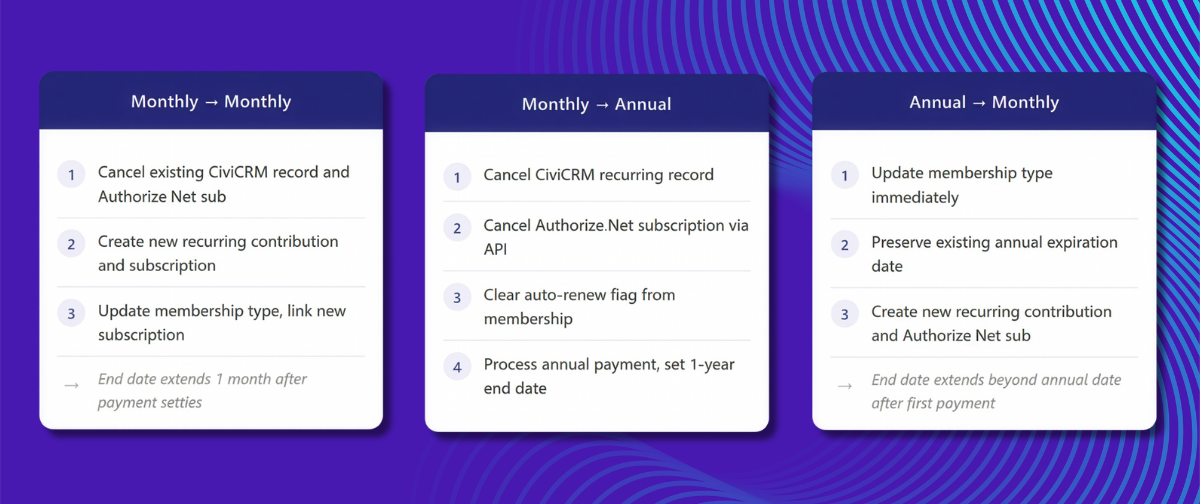
Monthly to Annual
When a member submits the annual form while a monthly recurring contribution is active, the extension:
- Cancels the recurring contribution record in CiviCRM
- Sends a cancellation request to Authorize.Net via API to stop the subscription
- Removes the auto-renew flag from the membership record by clearing the recurring contribution link
- Processes the one-time annual payment and sets the membership end date one year out
Monthly to Monthly
When a member resubmits the monthly form — whether to upgrade or change membership type — the extension:
- Cancels the existing recurring contribution and Authorize.Net subscription
- Creates a new recurring contribution and new Authorize.Net subscription
- Updates the membership type and links the new recurring contribution so the auto-renew flag reflects the correct active subscription
Once the new payment settles, CiviCRM extends the membership end date by one month and the new recurring cycle continues from there.
Annual to Monthly
When a member with an active annual membership switches to a monthly plan, there is no existing recurring contribution to cancel — the annual payment was one-time. A new recurring relationship is created without disrupting what the member has already paid for:
- The membership type updates immediately to the selected monthly membership type
- The existing annual expiration date is preserved — the member does not lose any coverage they already paid for
- A new recurring contribution and Authorize.Net subscription are created, and the auto-renew flag is set on the membership record
Once the first monthly payment settles, CiviCRM extends the end date one month beyond the existing annual expiration date, and monthly billing continues forward from there.
The Technical Piece That Made It Work
One issue we ran into: the standard CiviCRM ContributionRecur.cancel API was only updating the local database. It wasn't sending a cancellation request to Authorize.Net. That meant the subscription could still be active at the payment processor even though CiviCRM showed it as canceled.
We patched this by extending the API with two additional parameters — one to send the cancellation to the payment processor, and one to notify the contributor by email. When a recurring contribution is canceled through the membership form, both happen automatically.
Testing Required Patience
Membership transitions like these are difficult to test quickly. Authorize.Net doesn't settle recurring payments immediately. Each test scenario required waiting a day or more to confirm the old subscription was canceled on the payment processor side.
We ran three parallel test tracks — monthly to annual, monthly to monthly, and annual to monthly — and iterated through multiple rounds of testing with the Rigpa team before going to production.
When everything checked out, they launched their membership drive with confidence.
Why This Matters for Nonprofits
Membership organizations often rely on a mix of recurring and one-time contributions. Most CRM platforms handle the payment processing, but the logic around transitions — what happens when someone upgrades, changes levels, or simply resubmits a form — is rarely handled out of the box.
The gap between what CiviCRM records locally and what actually happens at the payment processor is easy to miss until a member notices they've been double-charged.
A well-configured CiviCRM setup, with the right extensions in place, can handle these edge cases automatically. Members get a smooth experience. Staff get time back.
Ready to Clean Up Your Membership Flow?
If your team is manually catching duplicate contributions or workarounds have piled up over time, we can help you sort it out. Reach out when you are ready.